
SLP progress report generator
IEP progress reports from saved session data
SLP Draft uses your entered goal criteria and recorded therapy data to draft each goal's progress update. Review current performance, session history and prompting, edit the paragraphs, then copy or download the text. These tracking updates are not saved as report documents.
14-day tracking and report-writing trial, no card. Activity Studio requires a paid plan for new accounts. Subscribe for $24/month or $240/year; paid checkout charges immediately.
How it works
Track data during sessions
Track a student or saved group in Live Session. Correct, incorrect and prompted trials remain distinct for each student's own goal. Record actual cue levels in observations and wait for successful saving before leaving.
Open the student when reports are due
In IEPs & data, open the student to see the goal chart and choose Generate under Progress update. Current performance and recorded history are kept separate.
Review criteria, counts and prompting
The draft uses the goal's own wording and recorded evidence, which can include logged activities and notes. Check the target criterion, session dates, original counts and support levels against your records.
Edit each goal paragraph, then copy or download
Verify the goal status and educational-impact wording yourself. Copy or download the text before leaving; paragraph edits are not saved as a document. There is no direct IEP-system or billing connection.
Fictional example progress update
Across 4 sessions from Sep 8, 2026 to Sep 29, 2026, Student J. answered who, what and where questions about a short story independently in 33 of 40 opportunities (83%). Including answers given after a prompt, Student J. answered correctly in 37 of 40 opportunities (93%). Prompted answers remain separate from independent correct answers. In the most recent session, Student J. answered independently in 9 of 10 opportunities during a story map with visuals activity. The goal criterion (8 out of 10 opportunities independently across three consecutive sessions) has not yet been met: Sep 22, 2026 was 7 of 10 independently, below the per-session target. Pooled accuracy alone does not establish mastery.
Example with a fictional student. You review and edit everything before it's used.
See a sample reportWhat the progress draft shows—and what you verify
- Entered goal criteria: the draft keeps the goal's target criterion separate from observed performance. Check the wording and unit—percentage, count, opportunities or consecutive sessions—against the IEP.
- Prompt levels: prompted trials stay separate from independent correct responses. Verbal, visual, gestural, tactile or other support comes only from what you recorded in observations. Verify that the wording does not imply a different level of independence.
- Data across sessions: current performance and recorded session history are kept separate. Review the session dates, original counts and any pooled result before deciding whether the goal criterion is met.
You are the clinician: verify the goal status, prompting, activities and educational-impact wording, then edit the paragraph. This is a session-data progress draft, not an evaluation report or an eligibility decision.
See how session data and cueing are recorded · See the separate evaluation-report workflow
Inside the tracking workspace
Real SLP Draft interface screenshots with fictional demo data. These were captured in an isolated browser demonstration, not a customer account. The graph shows recorded independent accuracy, not an estimate of unobserved performance.
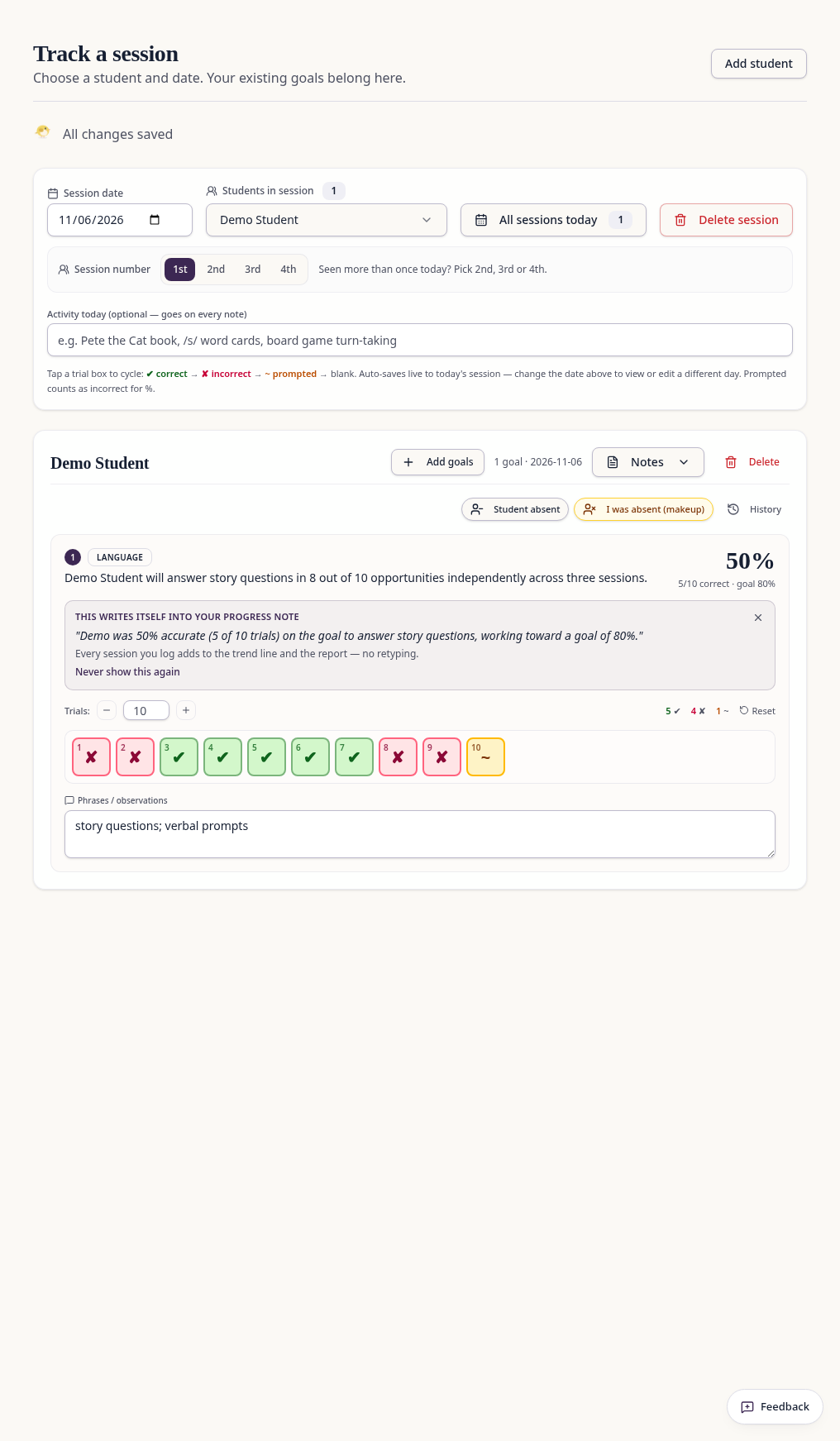
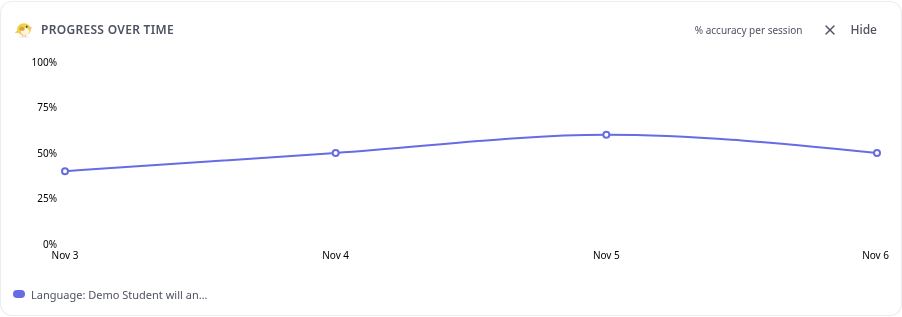
Sample: from session data to a progress update
Fictional example. "Student J." is an invented student. The goal, dates and counts were made up to show the method. No real student data is used.
Input 1: the IEP goal
Student J. will answer who, what and where questions about a short story read aloud in 8 out of 10 opportunities independently across three consecutive sessions.
Baseline: 4 out of 10 opportunities independently (fictional baseline)
Input 2: recorded sessions
| Date | Independent | Prompted | Incorrect | Indep. % | Met 8/10? |
|---|---|---|---|---|---|
| Sep 8, 2026 | 8 | 1 | 1 | 80% | Yes |
| Sep 15, 2026 | 9 | 0 | 1 | 90% | Yes |
| Sep 22, 2026 | 7 | 2 | 1 | 70% | No |
| Sep 29, 2026 | 9 | 1 | 0 | 90% | Yes |
Activities noted: picture-book retell, story map with visuals.
- Independent responses total 33/40 (83%). Prompted responses stay separate and are not added to the independent numerator.
- The last three sessions were 9/10, 7/10 and 9/10 independently. September 22 interrupts the required three-session run, so the pooled 83% does not establish mastery.
Output: an illustrative draft
Across 4 sessions from Sep 8, 2026 to Sep 29, 2026, Student J. answered who, what and where questions about a short story independently in 33 of 40 opportunities (83%). Including answers given after a prompt, Student J. answered correctly in 37 of 40 opportunities (93%). Prompted answers remain separate from independent correct answers. In the most recent session, Student J. answered independently in 9 of 10 opportunities during a story map with visuals activity. The goal criterion (8 out of 10 opportunities independently across three consecutive sessions) has not yet been met: Sep 22, 2026 was 7 of 10 independently, below the per-session target. Pooled accuracy alone does not establish mastery.
Every number above comes from the table. This shows the kind of update SLP Draft drafts; real drafts vary with your data and wording. After generating, verify the original counts, prompt notes, per-session results and consecutive-session requirement against your records, then edit before copying. A draft is not clinical advice or a clinical decision. Progress updates are not saved as report documents; copy or download the text before leaving.
Read a step-by-step worked example of writing a progress report by hand
Common questions
Related reading and free tools
- Is SLP Draft only a report writer?
- No. SLP Draft is an all-in-one workspace for school SLPs: live data tracking, goal progress, notes, Activity Studio and report drafting. Each uses the existing student or case workflow; you review the output.
- Is this SLP data collection software for school-based SLPs?
- Yes. It supports individual and group trial recording, goal-level graph lines and reviewed progress updates from saved records, without a direct IEP-system or billing connection.
- Can I track individual and group sessions?
- Yes. Select a student or a saved group in Live Session. Each student's trials are stored separately against their own goal and session date; group results are not combined into one child's accuracy.
- How are prompts recorded?
- Trial boxes cycle correct, incorrect, prompted, then blank. Prompted responses are not counted as independent correct responses. Add the prompt type or support you actually provided in the observation field; the trial mark alone does not record a verbal, visual or tactile cue level.
- Can I see graphs for individual goals?
- Yes. Open the student in IEPs & data to see Progress over time. Each active goal has its own line and legend on the student's chart. Same-day counted trials are pooled; empty, unattempted trials are excluded. Older percent-only records cannot provide original trial counts.
- How do saved sessions become an editable progress update?
- Wait for the live session to finish saving, then open that student in IEPs & data and choose Generate in Progress update. Review the present-levels summary and edit each goal's progress paragraph. Counts and criteria come from the recorded goal data; only recorded notes can support activity or prompt descriptions. Copy or download each goal's update as text.
- Is the progress update saved as a report document?
- No. The generated tracking progress update and your paragraph edits are not saved as a document. Copy or download the text before leaving. Saved session data stays available. Evaluation report drafts use the separate case workspace, where sections are saved and export to Word.
- What are the limits?
- This is not standardized testing, a diagnosis, an eligibility decision or a direct IEP-system or Medicaid billing integration. Sparse data may be insufficient for a trend or goal criterion. Check every draft against your actual records; no unrecorded skills, prompts or improvement should be inferred. Use only information your district permits; initials alone do not guarantee de-identification.
- Is the sample real student data?
- No. The goal, dates and counts are fictional demonstration data. Every number in the sample paragraph is calculated from the visible table.
Not ready yet? Get the free SLP toolkit by email.
Try it with your next session.
Try IEP goal and session data tracking, progress monitoring, and report drafts for 14 days. Activity Studio requires a paid plan for new accounts.